Simulators
Boot, stop, and reset iOS and watchOS Simulators directly from the VSCode sidebar. SweetPad drives xcrun simctl, the same tool
Xcode's Devices and Simulators window uses behind the scenes.
What you can do
- 🚀 Boot: click ▶️ next to a simulator to boot it.
- 🛑 Stop: click ⏹ to shut it down.
- 📱 Open the simulator: click 📱 at the top of the Simulators panel to open the simulator window.
- 🔄 Refresh: click ↻ to re-read the installed simulators list.
- 🧹 Remove simulator cache: clears the simulator cache, which helps when boot starts to misbehave (see Troubleshooting).
If something's missing, open a discussion or issue on the SweetPad GitHub repository.
Keep the Simulator app in the background
By default, launching the app brings the Simulator window to the foreground every time. If you'd rather stay in VSCode, which is typical when iterating quickly, doing hot-reload work, or using keyboard automation to drive the Simulator, turn that off:
{
  "sweetpad.build.bringSimulatorToForeground": false
}
The Simulator still boots and runs the app; only the focus-stealing window activation is suppressed.
Logs from the simulator
os_log, Logger, print, and NSLog output from your simulator-running app is streamed into the build terminal
alongside compiler output, with no separate Console.app required. For Simulator runs the stream is implemented as
xcrun simctl spawn <udid> log stream --predicate <…> --level debug --style ndjson; for macOS runs SweetPad
invokes the host log stream with the same flags. The filtering knobs Apple's log tool accepts work in both
cases.
Turn the stream off
{
  "sweetpad.build.logStreamEnabled": false
}
Customize the predicate
By default the predicate matches by process image (process + sender) rather than by subsystem, so apps that don't
use Logger(subsystem:) still surface and Apple framework chatter stays out. Override the whole predicate with
sweetpad.build.logStreamPredicate when you need finer control, for example to keep only a specific subsystem, or
to widen the filter to a framework you're debugging:
{
  "sweetpad.build.logStreamPredicate": "processImagePath CONTAINS '${processName}'"
}
${bundleId} and ${processName} are substituted with the running app's bundle identifier and CFBundleExecutable
before the predicate is passed to log stream.
logStreamPredicate and logStreamEnabled apply to simulators and macOS runs (anything launched via log stream). Physical iOS devices stream through pymobiledevice3 and use a different filtering model. See
Devices → Filter what reaches the terminal.
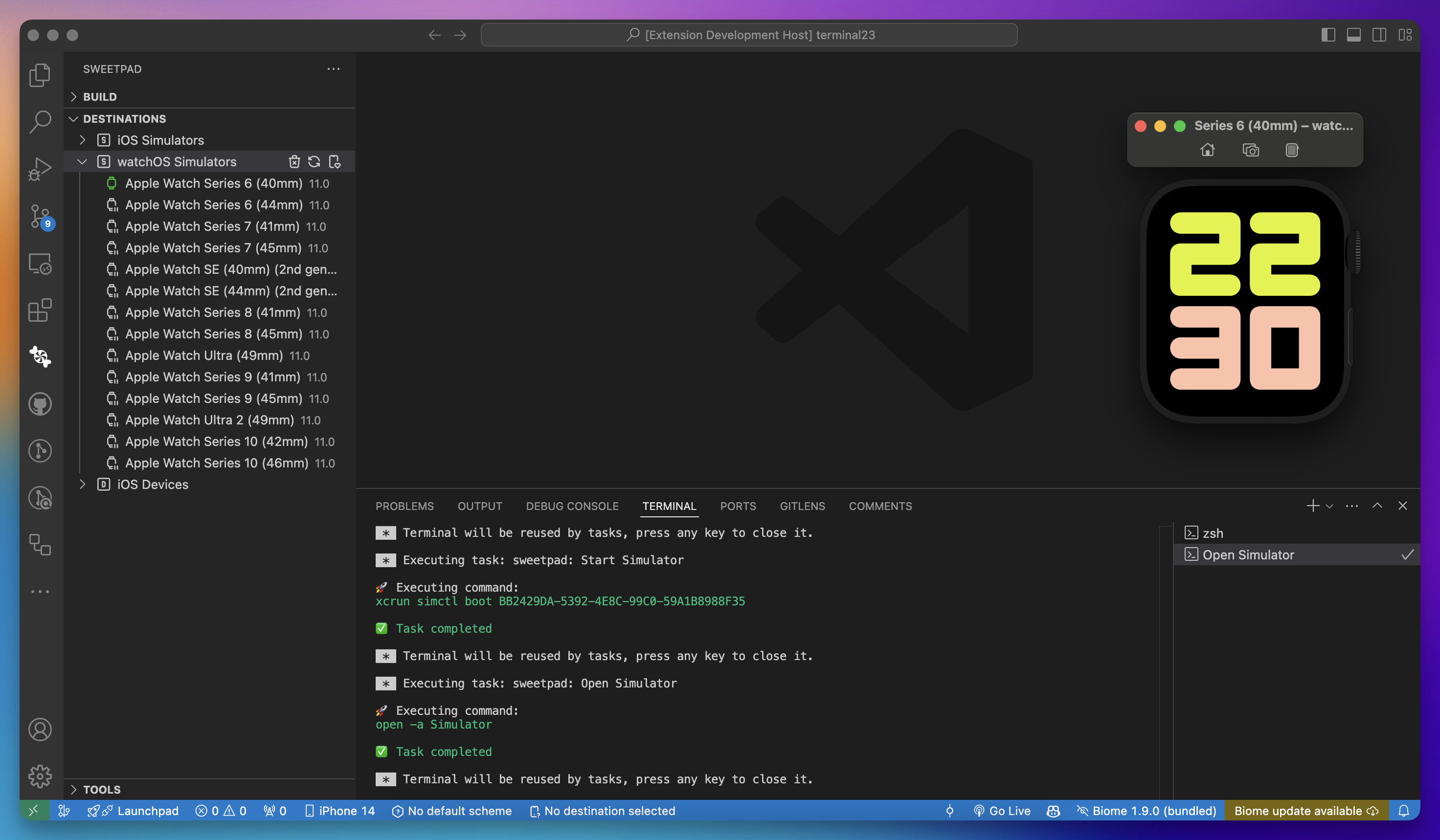
watchOS simulators
watchOS Simulators show up in the Destinations view alongside iOS Simulators and behave the same way: boot, stop, and run your app from the SweetPad sidebar. Everything above (logs, foreground focus, cache cleanup) applies to them too.
Troubleshooting
If booting fails with
Failed to start launchd_sim: could not bind to session, launchd_sim may have crashed or stopped responding, click
Remove simulator cache in the Simulators panel and try again.